
Jeep Cherokee (KL): Media hub
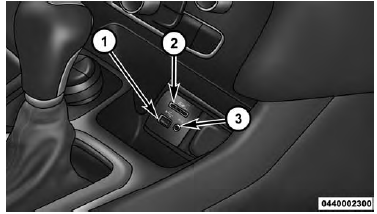
Media Hub
1 - USB Port
2 - SD Card Slot
3 - AUX Jack
Located in the front storage area, this feature allows an External USB device, SD card or AUX electronic device to be plugged into the port, slot or jack.
For further information, refer to the Uconnect User's Manual.
 SiriusXM Setup. Restore Settings. Clear Personal Data
SiriusXM Setup - If Equipped
After pressing the "SiriusXM Setup" button on the touchscreen,
the following settings will be available:
Channel Skip
SiriusXM can be programmed to designate a gro ...

The remote sound system controls are located on the rear
surface of the steering wheel. Reach behind the wheel to
access the switches.
Remote Sound System Controls (Back View Of Steering Wheel) ...
Other materials:
Description and operation
8 1/4 Axle
DESCRIPTION
The 8 1/4 inch axle housings consist of a cast iron
center section with axle tubes extending from either
side. The tubes are pressed into and welded to the
differential housing to form a one-piece axle housing
(Fig. 1).
The axles have a vent hose to relieve internal pr ...